FLUX Pixel Art Characters | LoRA Training Guide
Task: Text-to-Image (Pixel Art Characters)
Base: black-forest-labs/FLUX.1-dev · Adapter: LoRA (attention layers)
Hardware: NVIDIA A100
This LoRA adapts FLUX to generate retro pixel-art characters with clean silhouettes and limited palettes — ideal for game assets, avatars, character sheets, and concept art.
Examples
| Prompt | Output |
|---|---|
pixel art character, red hair, gray armor, no weapon, facing forward | 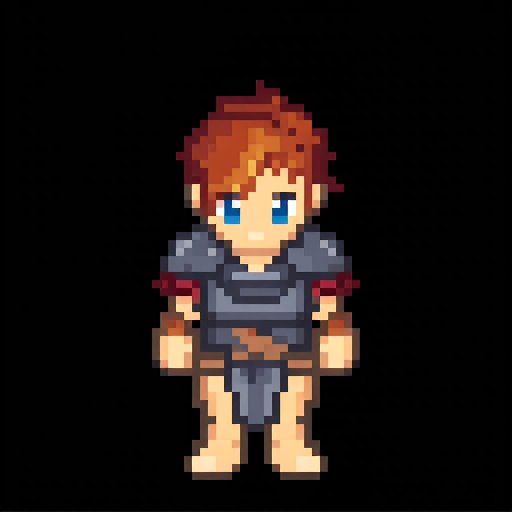 |
pixel art character, red hair, brown armor, no weapon, facing forward | 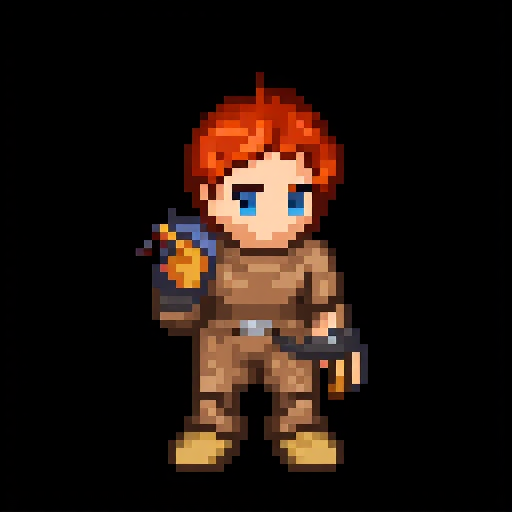 |
pixel art character, brown hair, blue clothing, no weapon, facing forward | 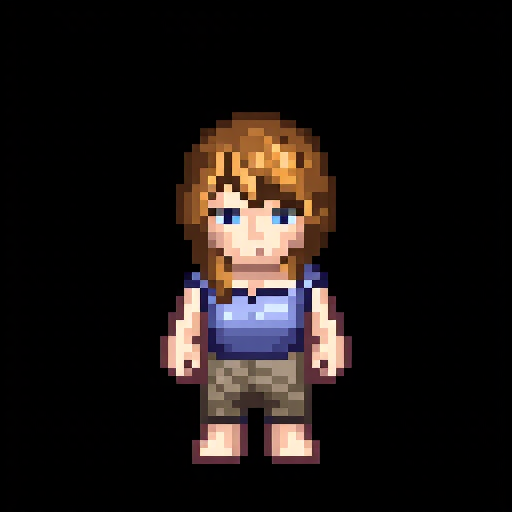 |
Quickstart (Diffusers)
import torch
from diffusers import FluxPipeline

pipe = FluxPipeline.from_pretrained(
    "black-forest-labs/FLUX.1-dev",
    torch_dtype=torch.float16
).to("cuda")

# Load the LoRA adapter
pipe.load_lora_weights("milliyin/pixel_art_characters_lora_flux_nf4")

prompt = "pixel art, rpg adventurer, green cloak, clean outline, limited palette, facing forward"
image = pipe(
    prompt=prompt,
    negative_prompt="blurry, low quality, distorted, ugly",
    height=512,
    width=512,
    guidance_scale=7.5,
    num_inference_steps=50,
).images[0]

image.save("sample.png")
If you want the matching project case study for this work, head here: Flux 1 In Context Learning project page.
You can browse the rest of my shipped AI work here too: AI projects and case studies.
Prompting Tips
- Use compact prompts:
pixel art, [role/class], [palette cue], facing forward - Add presentation cues:
clean outline,limited palette,8-bit,sprite sheet style - Negative prompt: remove blur/noise and photographic artifacts.
Non-Technical Overview
- What this is: A small add-on ("LoRA") that teaches FLUX how to draw characters in pixel-art style.
- Why LoRA: Instead of retraining the whole model, LoRA learns just the style — faster, cheaper, and easy to share.
- What you need: The base FLUX model + this LoRA + a short prompt.
- Who it's for: Indie devs, artists, prototypers who want consistent pixel characters quickly.
Technical Details (Training)
Data Pipeline
- Dataset:
haidarazmi/lora-pixel-art-characters-datases(HF Datasets) - Resolution: 512×512 (resize → random crop)
- Conditioning: Pre-computed text embeddings (per-image) loaded from a Parquet file, aligned by image hash
- Batching:
train_batch_size = 1, gradient accumulation to achieve an effective batch >1 without OOM
Model & Adapters
- Base:
black-forest-labs/FLUX.1-dev(Flow-matching diffusion) - Trainables: LoRA adapters inserted into Transformer attention (
to_q,to_k,to_v,to_out.0) - Rank:
r = 4(compact, faster to train/serve) - Quantization: NF4 (bitsandbytes) to reduce VRAM while training attention blocks
Objective & Scheduler
- Noise schedule:
FlowMatchEulerDiscreteScheduler - Loss: Weighted MSE on velocity target (
noise - latents) - Guidance: Conditioning via pooled/text embeddings
Optimizer & Precision
- Optimizer:
AdamW8bit(bitsandbytes) - LR:
1e-4constant schedule - Precision: FP16 mixed precision; gradients clipped to 1.0
Latent Caching
Encoded latents are pre-cached with the VAE once (then VAE is freed) to minimize compute during training.
Key Hyperparameters
width=512, height=512
rank=4
learning_rate=1e-4
train_batch_size=1
gradient_accumulation_steps=4
max_train_steps=700
mixed_precision=fp16
checkpointing_steps=100
guidance_scale=1.0
device=NVIDIA A100
Evaluation & Results
- Goal: Stylistic consistency across characters, clean silhouettes, readable armor/clothing at 1× zoom.
- Qualitative: Prompts constrained to ~5–15 tokens produce stable sprite-like characters; long prompts trend toward full-frame art.
- Failure cases: Over-detailed prompts may yield non-pixel textures; very high guidance can produce aliasing artifacts.
Limitations
- Style is tuned for single characters, mostly front-facing.
- May mimic dataset biases (pose, attire, palettes).
- Non-commercial use only under CC BY-NC 4.0.
Plain-English Walkthrough
- Start from FLUX (a powerful image model).
- Add a small "style brain" (LoRA) that learns pixel-art rules.
- Feed the model many pixel-art characters and tell it what each image represents.
- The LoRA learns how to draw characters like the examples.
- Later, you load FLUX + LoRA and write a short prompt — the model outputs a new pixel character.
Citation
@software{milliyin_flux_pixelart_lora_2025,
  title   = {FLUX Pixel Art Characters — LoRA},
  author  = {Milliyin},
  year    = {2025},
  note    = {LoRA adapter for FLUX.1-dev tuned for pixel art characters},
  url     = {https://huggingface.co/milliyin/pixel_art_characters_lora_flux_nf4}
}
Explore more
More AI project work behind this post
If you want to see more shipped AI systems, browse the full projects collection or jump into the related case study below.